MALT c'est quoi ?
L'optimisation est une activité connue de bien des développeurs, fouiller, chercher dans son code, pour, peut être, gagner un peu de performance (beaucoup, parfois). Dans cette tâche ardue, face à des codes grandissants, massifs, utilisant de nombreuses bibliothèques externes, un outil central dans ce travail de fourmi : le profileur.
Le profileur fait partie des outils importants pour le développeur qui se soucie des ressources qu'il utilise. Il lui permet de chercher les points chauds dans son code, comprendre le cout de chaque fonction, chaque ligne implémentée. Bien des outils s'intéressent à une chose : bien utiliser votre processeur.
Mais que se passe-t-il si vous rencontrez des difficultés avec l'utilisation de votre mémoire ? Si vous pensez mal utiliser la fonction malloc() du C ou l'opérateur new du C++ ? Si vous avez oublié qu'une de vos variables globales occupe 10 Go (surtout en Fortran) ?
Publié il y a quelques années MALT (licence CeCILL-C) permet de répondre à la question en cherchant toutes les allocations mémoires faites par votre code. Cet outil avait fait l'objet d'un article sur LinuxFR en 2018 lors de sa mise en open source : Profileurs mémoire MALT et NUMAPROF.
Versions 1.6.0
Avancées
Depuis, cet outil fait son chemin avec l'ajout du support de Rust ainsi que nombreuses corrections et ajouts tels que la possibilité de dumper le profile mémoire juste avant que le système ne soit plein.
malt -o dump:on-sys-full-at=80% -o watch-dog=true ./mon_programme

# également :
#  -o dump:on-app-using-rss=10G
#  -o dump:on-app-using-virt=80%
#  -o dump:on-app-using-req=500M
La possibilité de suivre les appels à mmap, mremap, munmap si vous les appelez directement dans votre code au lieu de laisser malloc faire son travail.
Support de python
MALT a initialement été développé dans le contexte du calcul à haute performance — HPC (High Performance Computing) donc surtout pour le C / C++ / Fortran / Rust.
Dans la communauté scientifique, nous voyons dans les laboratoires de plus en plus fleurir l'usage d'un langage à priori bien éloigné de nos prérogatives de performances : Python.
Dans un cadre de calcul scientifique, il est souvent utilisé plutôt comme un wrapper permettant d'appeler et d'orchestrer des bibliothèques en C /C++ / Fortran, elles, performantes. Quoi que l'usage amène aussi à l'écrire de certaines parties du code en Python grâce à Numpy ou Numba pour accéléré la partie calcule sur des tableaux ou autres frameworks d'exploitation des GPU.
La version 1.6.0 de MALT vient d'ajouter le support (encore quelque peu expérimental) natif de Python permettant d'analyser un code pur python ou mix Python / C / C++…. Il s'agit pour l'instant de la première version avec ce support, il reste donc du travail.
Sont supportés les versions Python supérieures à 3.11 ainsi que les environnements Conda / Anaconda / Venv. À l'heure de rédaction de cet article, cela comprend les versions 3.11 à 3.14.
MALT étant orienté C / C++, il ne supporte que Linux comme système d'exploitation. (NdM: la causalité évoquée ici devrait faire réagir des développeurs d'autres systèmes libres notamment :))
Utilisation sur Python
Si la commande malt fonctionne parfaitement, il est recommandé d'utiliser le wrapper malt-python qui adapte quelques configurations spécifiques à Python non encore automatiques.
malt-python ./script.py

# équivalent à
malt --profile python-default ./script.py

# liste des profiles
malt --profile help

# Afficher le profile
malt-webview ./malt-script-py-6889.json
Profilage rapide
Notons que l'overhead de MALT est important en Python du fait du large nombre d'allocations générées par ce langage et de la méthode de résolution des piles d'appels pour retrouver les lignes dans votre code. Ces détails d'analyse peuvent être désactivés via :
# Désactivé complète de l'analyse des piles
malt-python -p python-no-stack ./my_script.py

# Analyse des piles par "sampling"
malt-python -p python-sampling ./my_script.py
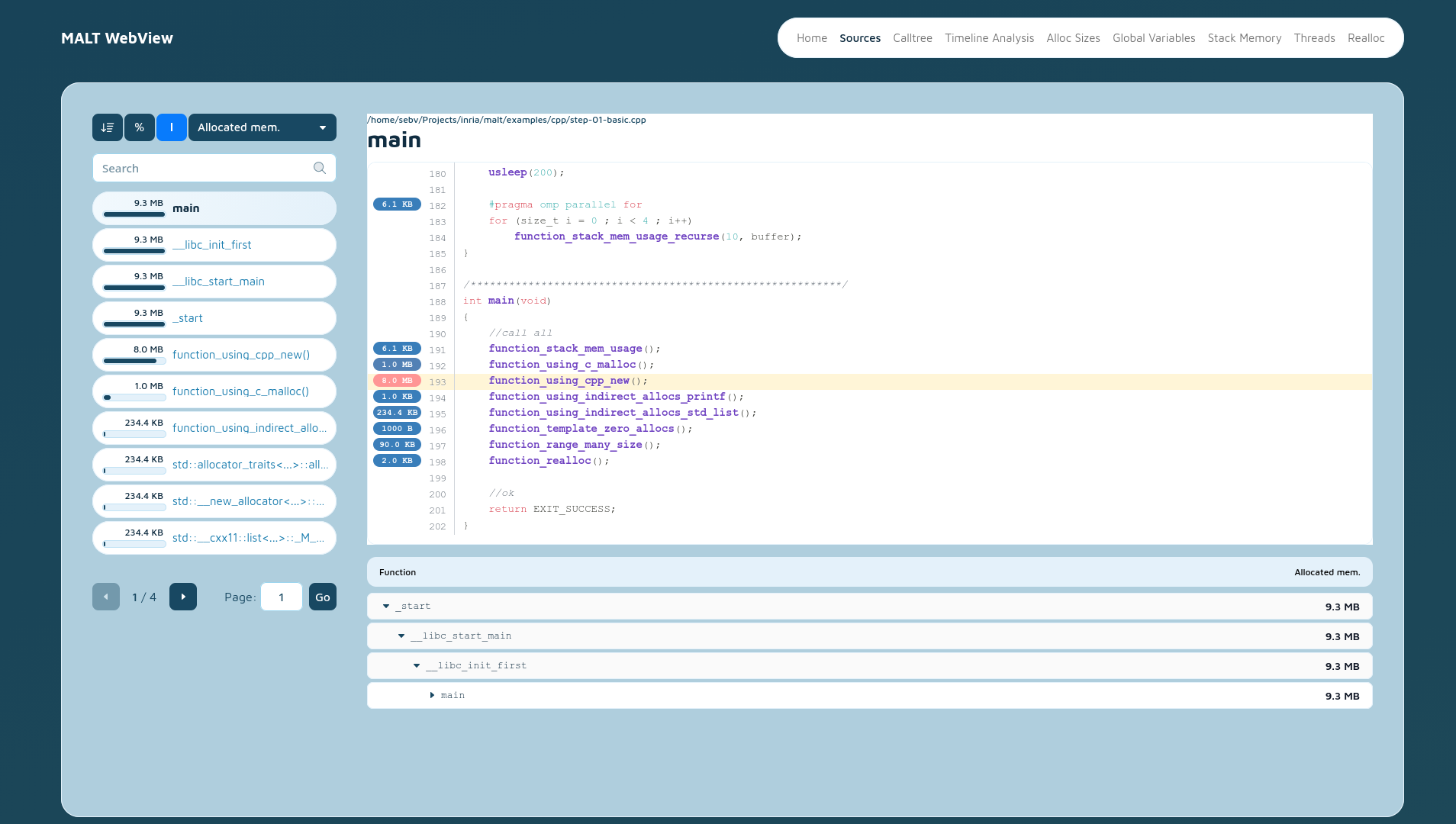
Nouvelle interface
La version 1.6.0 arrive également avec une nouvelle interface graphique avec un code remis à jour
par rapport à sa version originale vieillissante.
Profil statique
Pour ceux qui voudraient échanger les profils avec d'autres sur d'autres OS, il est possible depuis la 1.6.0 de générer une version statique des pages de l'interface (hors annotation des sources et arbre d'appel navigable) via :
# Toues les pages possible en statique
malt-webview -static ./report malt-progr-123456.json

# Seulement la page de résumé.
malt-webview -static-summary ./report malt-progr-123456.json
Installation
MALT n'est pas encore disponible dans les distributions classiques, vous devez donc le compiler et l'installer à la main. Le nombre réduit de dépendances obligatoires en fait un outil relativement facile à installer.
On trouvera la procédure dans la documentation du projet.
Documentation
La documentation a été complètement ré-écrite et disponible sur le site officiel : documentation.
Outils similaires pour Python
Découvrir un outil est aussi l'occasion d'en découvrir d'autres. Restons dans le monde du Python, si MALT ne vous convient pas vous trouverez peut-être votre bonheur avec les outils suivants et complémentaires à MALT et eux totalement dédiés au Python toujours pour la mémoire :
-
Memray (Apache Public License 2)
-
Scalene (Apache Public License 2)
MALT se positionne par rapport aux deux présentés en apportant une analyse fine en annotant tout le source code de l'application. Il offre également une analyse des variables globales et TLS coté C/C++/Fortran/Rust.
 Connexion
 Microsoft is taking a cue from Linux with its new Command Palette Dock proposal for PowerToys, which lets Windows users add a second panel to their desktop complete with widgets, flexible positioning and custom theming. Functionality that is standard across most Linux desktop environments (for decades), and a reminder of how inflexible Windows and its single Taskbar is by default. The idea, posted by Microsoft designer Niels Laute on GitHub, is to add a Command Palette Dock in PowerToys to compliment the (popular) Command Palette. Command Palette is a newer PowerToys feature that provides a keyboard-driven launcher for extensions that […]
 AUSTRUMI (Austrum Latvijas Linukss) is a bootable live Linux distribution based on Slackware Linux. It requires limited system resources and can run on any Intel-compatible system with a CD-ROM installed. The entire operating system and all of the applications run from RAM, making AUSTRUMI a fast system and allowing the boot medium to be removed after the operating system starts.

 AerynOS is an independently-developed, rolling-release Linux distribution designed for general desktop use. Its main features include the GNOME desktop, a custom package manager called "moss", atomic updates with rollback options, a package build system called "boulder", and smart boot management with complex EFI configuration through a utility called "blsforme".
 Linux Lite is a beginner-friendly Linux distribution based on Ubuntu's long-term support (LTS) release and featuring the Xfce desktop. Linux Lite primarily targets Windows users. It aims to provide a complete set of applications to assist users with their everyday computing needs, including a full office suite, media players and other essential daily software.
  ZimaOS is an independently-developed, Linux-based operating system for personal servers and network-attached storage (NAS) devices. It features system-level support for remote access, RAID configuration, over-the-air (OTA) updates, and a browser-based user interface for managing the server. It is developed in China by IceWhale Technology Limited, which also produces and sells specialist storage hardware devices called "ZimaCube". Besides ZimaOS which is a complete, standalone operating system, the company also produces CasaOS, a lightweight software layer that can be installed on top of an existing Linux installation in order to turn it into a personal server or a NAS.

 The Amnesic Incognito Live System (Tails) is a Debian-based live DVD/USB with the goal of providing complete Internet anonymity for the user. The product ships with several Internet applications, including web browser, IRC client, mail client and instant messenger, all pre-configured with security in mind and with all traffic anonymised. To achieve this, Incognito uses the Tor network to make Internet traffic very hard to trace.
  Whonix is an operating system focused on anonymity, privacy and security. It is based on the Tor anonymity network, Debian GNU/Linux and security by isolation. Whonix consists of two parts: One solely runs Tor and acts as a gateway, which is called Whonix-Gateway. The other, which is called Whonix-Workstation, is on a completely isolated network. Only connections through Tor are possible. With Whonix, you can use applications and run servers anonymously over the Internet. DNS leaks are impossible, and even malware with root privileges cannot find out the user's real IP.
  Kicksecure is a security-hardened Linux distribution based on Debian's "Stable" branch, with Xfce as the default desktop user interface. It is a hardened operating system designed to be resistant to viruses, malware and attacks, and extensively reconfigured in accordance with an advanced multi-layer defense model, thereby providing in-depth security. Kicksecure provides protection from many types of malware in its default configuration with no customization required.