Are you ready for some football?! The Super Bowl featuring New England Patriots (woohoo!) and Seattle Seahawks (boo!) is just a week away, and if you want to hear every bone-crunching hit, you'll want to ditch your TV's wimpy built-in speakers for a discrete audio setup. You don't have to break the bank, either, not when there are several
Philips Evnia is laying claim to what it says is the world's first dual-mode gaming monitor to hit a blistering-fast 1,000Hz refresh rate. While HKC may take umbrage with the claim, Philips Evnia's new flagship 27M2N5500XD is certainly in an elite class, one that will likely grow in number as time goes on but, for now, stands out from the
With Horizon OS v85 PTC, Quest 3 can turn any surface into a virtual keyboard, and Meta says you can remap the Quest 3S action button.
The Public Test Channel (PTC) is the beta release channel of Quest's Horizon OS. If you opt in, your headset receives a pre-release build of each upcoming version.
Note that there are often features in the eventual stable version not present in the PTC, and occasionally (but rarely) features or changes in the PTC don't make it to the stable version.
Here are 2 key features Meta is testing in Horizon OS v85 PTC:
Surface Keyboard
Text entry is a notorious challenge for XR devices when you're not carrying a connected Bluetooth keyboard.
Exclusively available as an experimental feature on Quest 3, and not the cheaper Quest 3S, Surface Keyboard adds a virtual keyboard on top of any surface, such as a table or desk.
To set it up, you place your hands flat on the table where you want the keyboard to be positioned, and a few seconds later it spawns. This is the height calibration step.
0:00
/1:05
UploadVR testing the Horizon OS v85 PTC Surface Keyboard.
Testing Surface Keyboard out for the first time, as you can see in the video below, I found it to be remarkably accurate. The ability to rest my hands makes it far preferable to a floating virtual keyboard, and I can type far faster already.
For me, and on the current build at least, it only shows up in the Horizon OS home space, passthrough or virtual. Meta has an API for developers to use the floating keyboard, and we'll keep an eye out for any signs of a similar API for Surface Keyboard when the feature launches to the stable channel.
Meta has been researching this technology for at least six years, and executives showed off a well-along prototype in 2023, with Mark Zuckerberg claiming he could reach 100 words per minute. However, that prototype required a tracking marker tag on the table, as could be seen in the clips Meta shared at the time. And the company didn't disclose the error rate of the prototype.
Then, in 2024, researchers from Meta and ETH Zurich said that they had solved the problem of turning any surface into a keyboard, without markers, by combining a neural network that predicts touch events with a language model.
Meta hasn't said whether this research is what led to the shipping feature, but it seems likely to at least be related.
You can find Surface Keyboard in the Advanced settings on Horizon OS v85 if you have a Quest 3.
It's unclear why the feature isn't (yet) available on Quest 3S.
Remap Quest 3S Action Button
While Quest 3S doesn't currently have the Surface Keyboard feature, it does get its own new exclusive feature in Horizon OS v85 PTC, according to Meta.
Quest 3S has an 'Action Button', which, since the headset launched, has served one function: toggling passthrough. Press it while in a VR game and the game will pause and you'll see the real world. It's essentially a "pause VR, I need to see my surroundings" button.
Now, with v85 PTC, Meta says that Quest 3S owners can remap the Action Button.
Our Quest 3S does not yet have v85 PTC, so we don't yet know what it can be remapped to. If you have a Quest 3S running Horizon OS v85 PTC and have this ability, please let us know in the comments below.
Navigator Set To Be Default & Horizon Feed Removed
If you missed it, earlier this week we reported Meta's announcement that "starting" in Horizon OS v85 stable, the new 'Navigator' UI will become the default, and, separately, the Horizon Feed will be removed.
The InWin Shift is completely open and a perfect home for components with an exhibitionist bent. It's also great for modders and those that test a variety of hardware and need easy…
The vast majority of IoT devices, from webcams to toasters get abandoned a few years after their release and often without any notification to the owners of the devices. This means that…
The history of computers is composed of an ever-growing number of consumer electronics devices, from game consoles to smartphones to music players, and the Computer History Museum's expansive catalog is now open for public viewing online for everyone to see via the just-launched "OpenCHM".
For those who can't make the trip to Mountain View,
The ink is barely dry on Apple’s deal with Google to utilize Gemini to train its own AI models, and today's announcement signals that the company is really ramping-up its AI ambitions. Apple just disclosed that it intends to acquire Q.ai for roughly $1.6 billion, which is a startup that specializes in implementing AI in applications that involve
An AI-powered toy company exposed more than 50,000 private chat logs between children and its products after leaving a web console almost completely unsecured. According to WIRED, anyone with a Gmail account could access transcripts of conversations kids had with Bondu's AI-enabled stuffed animals, along with names, birth dates, family details,
A federal investigation has been launched over a collision between a Waymo robotaxi and a young student in a Santa Monica, California school zone. The car reportedly exercised the right precautions while operating in the school zone, even if the onboard systems were blindsided by the child dashing from behind a nearby SUV.
The incident
D-Day VR Museum, as its name describes, is a virtual reality exhibition of one of the most pivotal moments in history, using every audiovisual tool to keep the education engaging. Read on for our full thoughts.
On June 6, 1944, the Allied Forces launched the largest amphibious assault in history, turning the tide on the beaches of Normandy, eventually winning the Second World War against the Axis powers. This defining moment came to be known as D-Day. Countless accounts of it have been recorded since, making it a key point in history where democracy prevailed. In the process, it has spawned books, movies, and now, a vivid virtual reality exhibition called D-Day VR Museum. Where this experience succeeds is in using every possible medium that a headset allows: from a traditional exhibit all the way to walking through recreated iconic locations and making the player relive the paratroopers' airborne landings.
The Facts
What is it?: An interactive VR museum about the D-Day invasion. Platforms: Steam Release Date: Out now Developer: Lichtblau IT Publisher: Diverently GmbH Price: $14.99
Beginning at a hall with four WWII uniforms and a desk, there are several options to approach: the options menu, the start of the tour, the five beaches invaded on D-Day, and an immersive view through the paratroopers’ lens. The first area is as you would expect in a real museum. Tanks, soldiers, jeeps, and propaganda from the 1940s all adorn the halls to better appreciate the historical stakes. An AI-voiced narration gives a detailed account of every aspect of the operation, including the background, leaders, and geopolitical situation. It only gets more complex from there.
3D-scanned models of real artifacts of the time can be physically held as the narrator explains what they were used for. Holding a Bombe machine, whose code Alan Turing deciphered to reveal strategic enemy communications, or a “Rupert,” which was a decoy parachuted alongside airborne soldiers, enhances the sense of presence of an otherwise normal museum visit. Hearing the stirring speech by Franklin D. Roosevelt on the evening of the decisive military operation while perusing through historical items gives a unique perspective of the era.
PC Specs Used
My gaming laptop uses an AMD Ryzen 7 250 w/ Radeon 780M Graphics Processor, 24 GB DDR5-5600MT/s SODIMM, and an Nvidia GeForce RTX 5060 8 GB GDDR7. This impressions piece was conducted using a Meta Quest 3 via the Steam Link app.
No performance issues were encountered during this playthrough. You can find the minimum and recommended specs on the Steam page to learn more.
What stands out the most about the D-Day VR Museum is, undoubtedly, its interactive element. Watching short video documentaries of the event certainly attunes you to the general feeling of extreme danger of the military campaign, with the entire Western ideology at risk. Visual aids like Google Street View-style 360 images of the current places where these critical events took place help understand the gravity of the situation. Most importantly, full-blown virtual recreations of places and moments hammer home the urgency each young serviceman went through. Being in the plane next to other fighters, listening to them pray, and finally throwing yourself to the uncertainty of what was on the ground is portrayed well here.
Comfort
D-Day VR Museum has the expected features of any virtual reality game. There is either smooth or snap turning and a vignette that can be turned off whose radius you can increase or reduce. The movement along the exhibit can be performed by manually moving the joystick to walk or by teleporting.
There are subtitles for every video documentary if needed, and the Nazi symbols can be removed.
0:00
/0:35
A gameplay video recorded by UploadVR of D-Day VR Museum. It's a scene of what the paratroopers went through.
D-Day VR Museum is a testament to what was at stake, what was lost, and what prevailed thanks to the tenacity of these unwavering soldiers. There is no better way to learn about the sacrifice the Greatest Generation made in order to achieve freedom from those who threatened it. As an interactive experience, it excels as a sobering reminder of this transcendental moment, putting players head-first into an equally entertaining and educational exhibition. As a history lesson, it delivers an emotionally charged remembrance that only VR can provide.
Dispatch, an episodic adventure game from an indie studio with a star-studded voice lineup including Aaron Paul, has earned critical acclaim since its release, but the recent arrival of a port to the Nintendo Switch and Switch 2 has caused some controversy, prompting responses from both Nintendo and AdHoc Studio.
Game censorship has picked
The new SilverStone MS12-40G is a compact and lightweight M.2 SSD enclosure featuring a 40 Gbps USB4 or Thunderbolt 4 interface with fan-based active cooling, letting you give an unused M.2 NVMe SSD a new lease of life as a formidable portable SSD.
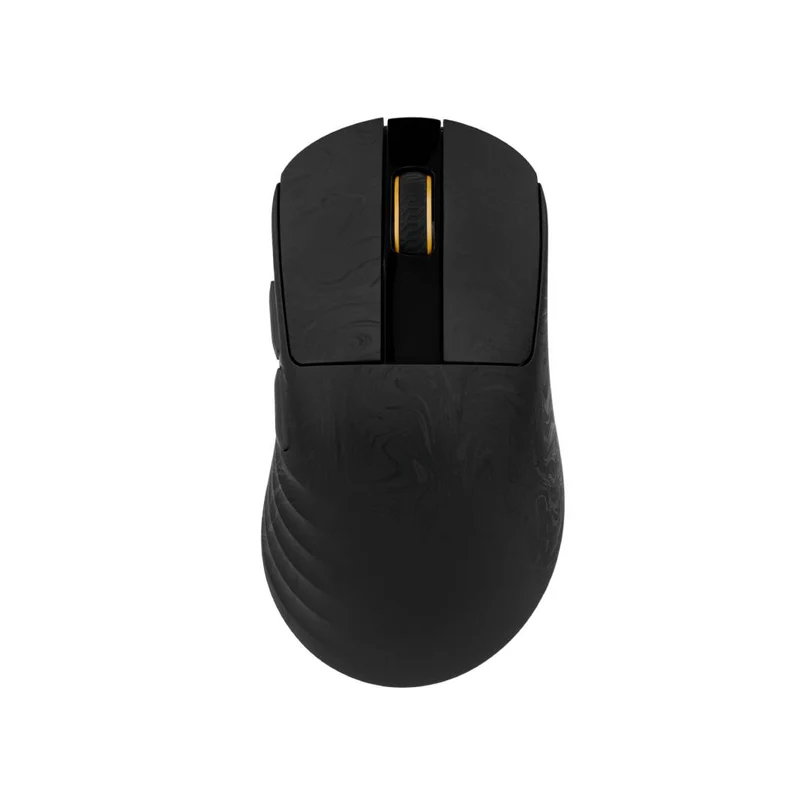
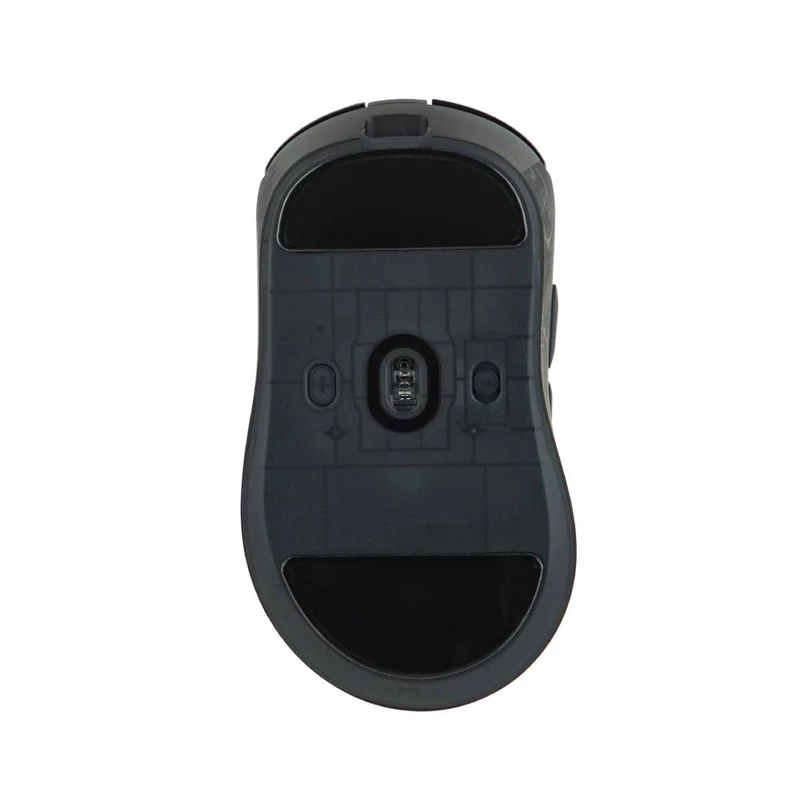
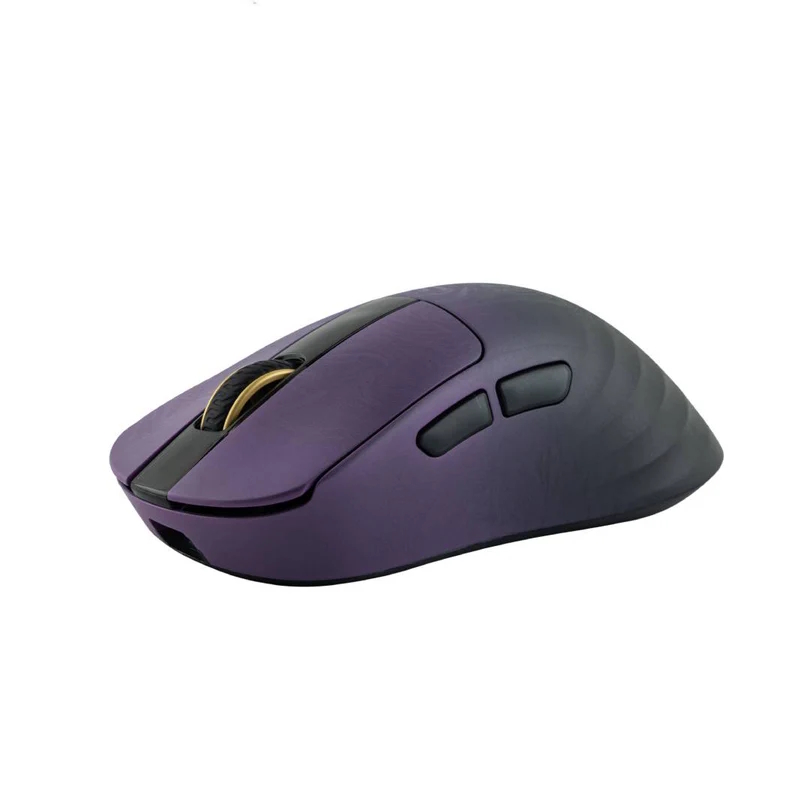
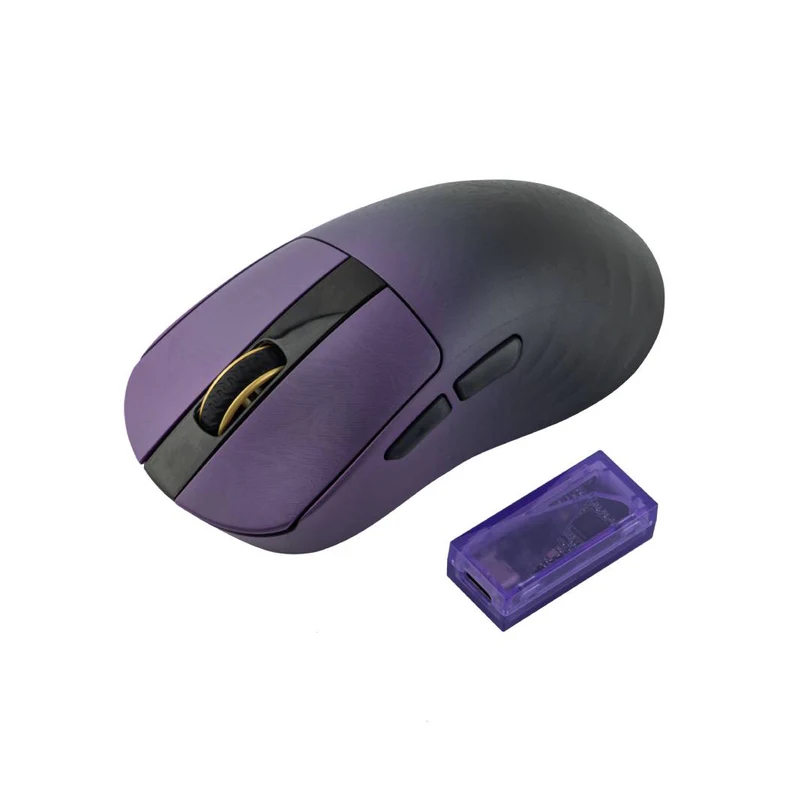
Epomaker is expanding its carbon mouse lineup with the Carbonis, a solid-shell, ergonomic carbon fibre gaming mouse. While its predecessor, the CarbonX, utilised a lattice-style honeycomb frame to save weight, the Carbonis adopts a solid right-handed ergo shape reminiscent of the Razer DeathAdder V4 Pro.
Using carbon fibre, Epomaker aims to deliver a structurally rigid frame that remains lightweight. Under the shell, the Carbonis (via TechPowerUP) is equipped with the flagship PixArt PAW 3950 sensor and the Nordic N54L MCU. This combination supports a native 8000 Hz (8K) polling rate for minimal input latency. Another standout feature is the integrated smart LCD screen on the top of the mouse, which provides real-time feedback on DPI settings, battery life, and current polling rates.
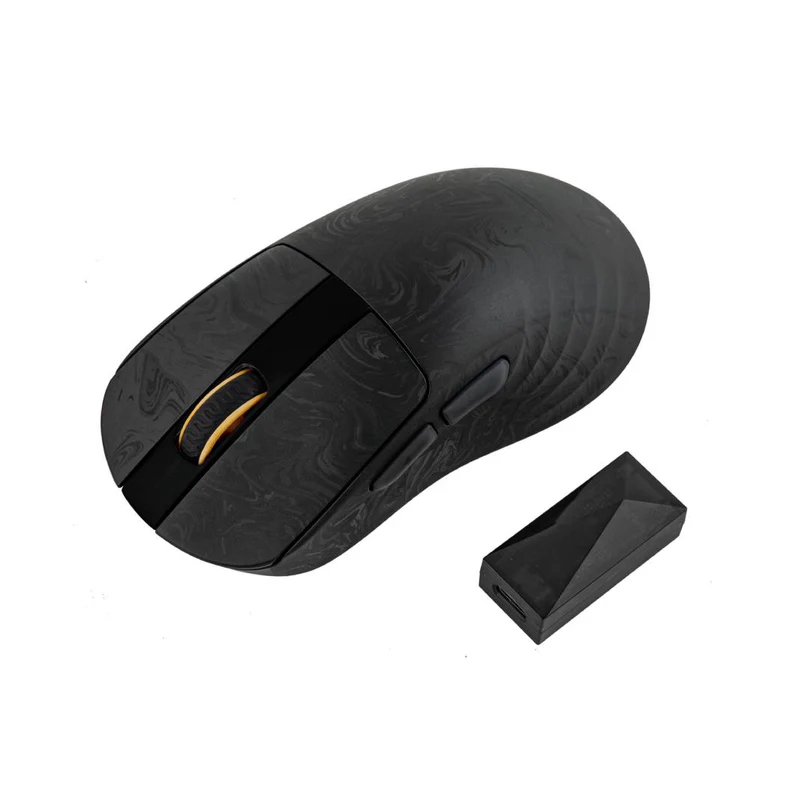
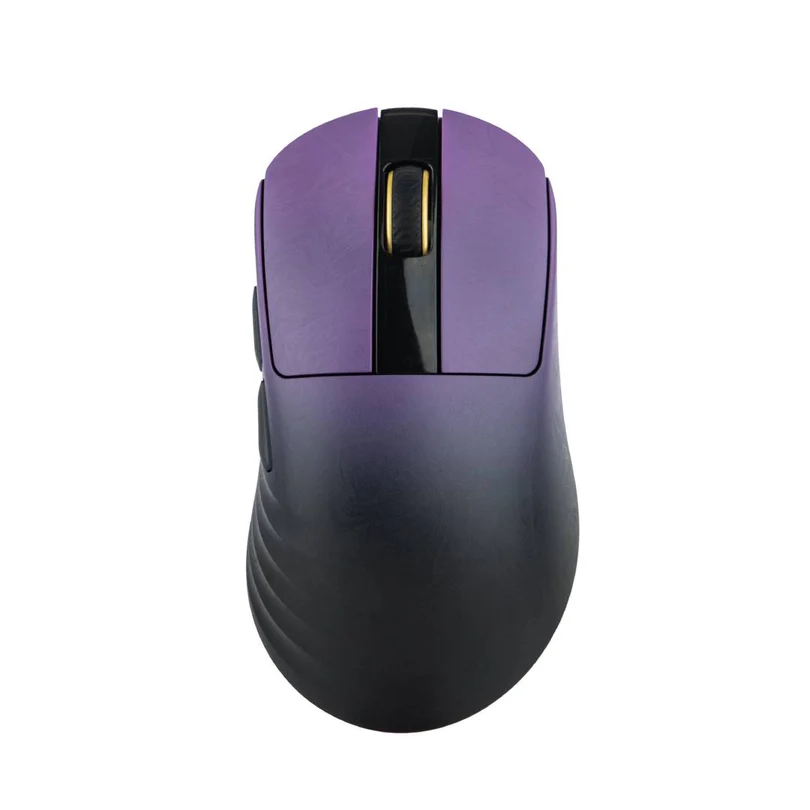
The device uses an online, web-based driver, allowing users to customise settings via a browser without the need for traditional software installations. As for aesthetics, the mouse will be available in two models: a black forged carbon pattern with a matching dongle, and a purple gradient with a transparent purple dongle.
The Carbonis is currently in its final pre-launch phase. Epomaker is offering a $1 early-bird reservation that entitles buyers to a $15 discount when the mouse officially goes on sale later this month. Pricing is yet to be defined.
KitGuru says: Carbon fibre is becoming quite common for enthusiast mice. Most of them are quite pricey, but from what we know about Epomaker, this one will likely be cheaper than its rivals.
Earlier this month, Ubisoft restructured its entire business and cancelled a number of projects, while also delaying others. Interestingly, Beyond Good and Evil was named as one of the main franchises to survive the restructuring and now, the sequel's director has confirmed that Ubisoft remains ‘committed' to the game.
Beyond Good and Evil 2 was announced all the way back in 2017 but the project has gone through many changes since then. At numerous points, fans have speculated that the project may have been cancelled but over the past year, numerous job listings have confirmed that the game is still in active development.
In a statement (via VGC), Beyond Good and Evil 2 director, Fawzi Mesmar said that Ubisoft “remain committed and focused” on delivering the long-awaited sequel. Mesmar also said that the game is “unaffected by the recent changes” at the publisher.
It is still unclear exactly when Beyond Good and Evil 2 will resurface, or when fans can expect to get their hands on it. If it ends up arriving in 2027, it will be the second 10-year project that Ubisoft has released in recent years, following Skull & Bones, which began development in 2013, but didn't release until 2024 due to numerous delays.
KitGuru Says: Beyond Good and Evil 2 is a bit of a headscratcher. It is a sequel to a cult classic game from the 2003, one that many had forgotten about until the sequel was announced in 2017. Ubisoft has much more popular classics under its wing that could do with a return to the spotlight, including the likes of Splinter Cell and Prince of Persia.
It would seem that the rumours of an incoming Nintendo Direct showcase are picking up steam. Multiple additional sources have since corroborated the claim that a new stream will be taking place in February.
Followed on from NatetheHate, GameXplain and VGC have also corroborated the claim that a Nintendo Direct will be happening next week. However, VGC adds that this is going to be a partner showcase, so don't expect any first-party Nintendo game announcements.
The stream is supposed to take place on Thursday, February 5th, focusing on new third-party games heading to the Switch and Switch 2 consoles. There are already some likely candidates in mind for the showcase.
Titles like Borderlands 4 and Elden Ring are still yet to receive official release dates for the Switch 2. Recent rumours also indicated that Final Fantasy 7 Rebirth is due to land on the Switch 2 later this year. There have also been rumblings around a Switch 2 upgrade for The Witcher 3, and Capcom also reportedly wants to bring Monster Hunter Wilds over to Nintendo's new system.
KitGuru Says: Fans of Nintendo's exclusive franchises will have to wait a while longer for news. In the meantime, there will be plenty of new ports on the way for the latest Switch console.
In just a matter of weeks, NVIDIA's original Shield TV console will turn 10 years old. What makes the milestone particularly remarkable is that even after a full decade of service, NVIDIA continues to dish out Android updates, and it has no plans of stopping. It's true that device makers have gotten better about longer term support for Android
Early last year, there was talk that the newly-discovered Asteroid 2024 YR4 had a really small, but probable chance of striking the Moon in 2032. Now, scientists are revealing what might occur if such as an event took place and the implications it could have on Earth.
Orbital path of YR4 (Credit: ESA Orbit Visualization Tool)
Currently,
For those of you who find smartwatches bulky or too much of a hassle to wear and fitness rings too limited, Rogbid's Fusion might be your jam. The Fusion takes the middle ground by being a smartring with a display that can also be worn as a smartwatch.
The Rogbid Fusion is basically a 2-in-1 hybrid. On one hand (or rather, finger), it
Not to beat a dead horse (too late), but a memory chip shortage is wreaking havoc on consumer device availability and pricing. That includes graphics cards, the all-important component for a gaming PC, which employ varying amounts onboard video RAM (VRAM). According to a fresh rumor, the situation has caused NVIDIA and its hardware partners
Aside from a slightly adjusted shape and lower weight of 46 g, the ambidextrous Harpe II Ace comes with ASUS's latest 42,000 CPI AimPoint Pro sensor, ASUS optical main button switches, 8000 Hz wireless polling, Bluetooth support, and an improved battery life of more than 100 hours without RGB lighting.
Apple's financial results for its fiscal 2026 first quarter shattered expectations, with revenue skyrocketing to a $143.8 billion, up 16% from the same quarter a year ago. It ranks as Apple's best quarter in the company's nearly 50-year history, and it's thanks in large part to record demand for iPhone devices.
"iPhone had its best-ever
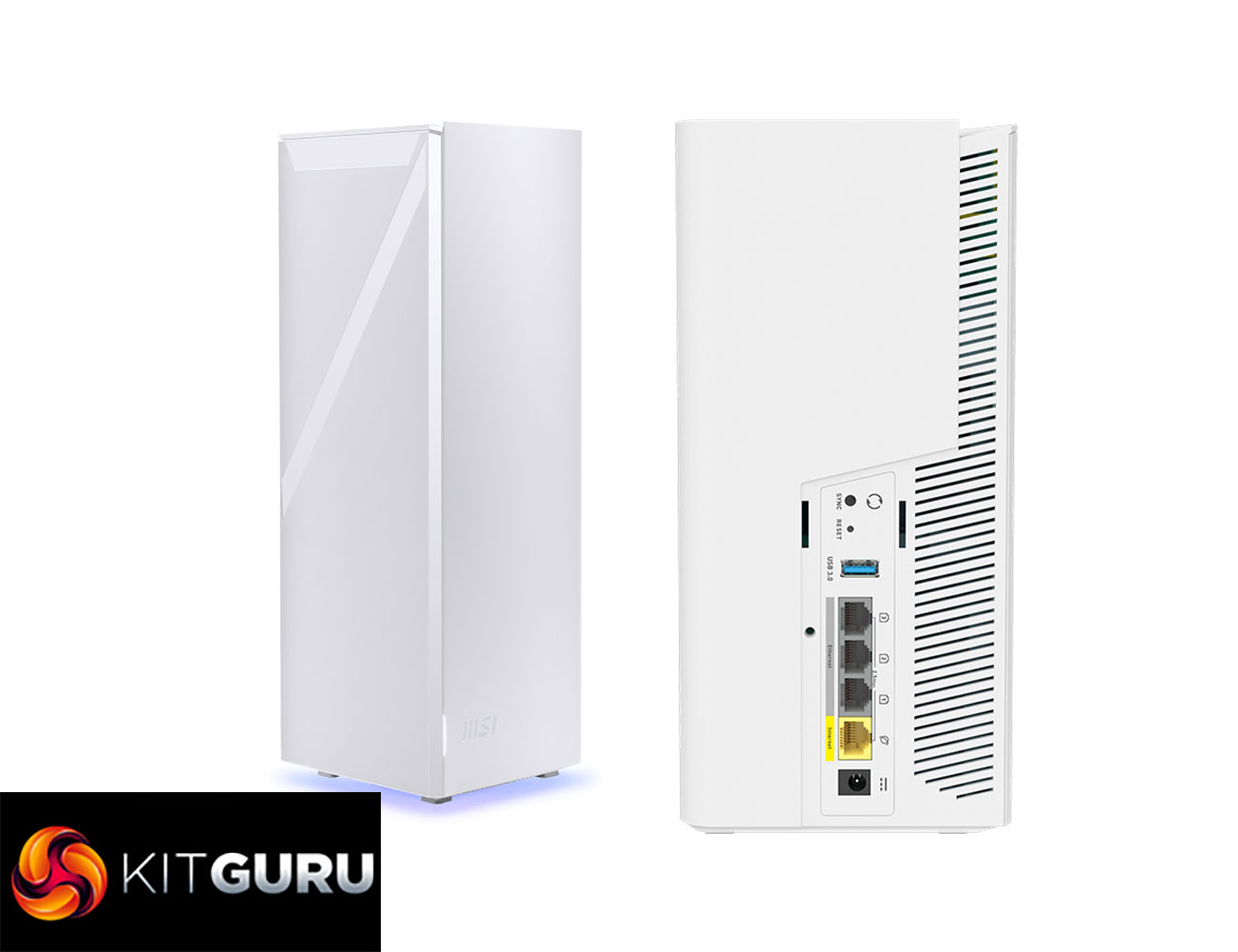
WiFi 7 is finally starting to gain traction, although we're still waiting for more client devices to arrive. If you're looking to upgrade your wireless network, it would now be a false economy not to future-proof yourself with the latest standard. Joining the WiFi 7 fray is MSI with its Roamii BE mesh system. It comes in two forms – Lite and Pro. The former offers just two radio frequencies, while the Pro we tested adds 6GHz, promising monster wireless network bandwidth. We put the Roamii BE Pro through our comprehensive WiFi mesh test suite to find out if the practice matched the theory.
The Roamii BE Pro is a BE11000 system, meaning it combines 5,764Mbits/sec at 6GHz, with 4,323Mbits/sec at 5GHz, and 688Mbits/sec at 2.4GHz, although MSI only promises a maximum combined throughput of 9.4Gbits/sec. The benefit of WiFi 7 (and WiFi 6 BE) is that 6GHz and 5GHz can be combined (with a compatible client) for maximum throughput. The Lite version loses the 6GHz, so offers just BE5000 performance.
You get 6x internal antennae (so two per waveband) with the Roamii BE Pro, plus additional router software and hardware features. The system can allegedly cover a 6,000 square feet area, although of course this will depend on obstructions. That's likely to be more than enough for a three story house, such as the one we use for testing.
The Roamii BE Pro has a solid wired networking specification too, with four 2.5Gbit Ethernet ports, one of which would be used for WAN duties on the router, while remaining available for wired devices on the satellite. There is a USB port on both units too, ready for network storage sharing.
Coming in at under £300, the Roamii BE Pro looks like good value too, giving you mesh WiFi for the price of a midrange standalone router. Read on to find out if the performance and capabilities make this a bit of a bargain.
A number of major Linux gaming projects are joining forces to form the Open Gaming Collective. The goal here is to reduce duplicated work across several crucial projects and centralise development efforts for critical components like kernel patches, input frameworks and display compositors.
The OGC's technical strategy (via GamingOnLinux) centres on an “upstream-first approach”. Rather than maintaining permanent forks or bespoke patches, the group intends to submit all improvements and hardware fixes directly to the source projects (such as the mainline Linux kernel or Mesa). Early deliverables include a shared, gaming-optimised OGC Kernel and a specialised fork of gamescope designed to expand hardware support across a wider range of handhelds and desktop GPUs.
Bazzite, one of the founding members, has already outlined immediate changes resulting from joining the collective. The distribution will phase out its custom Handheld Daemon (HHD) in favour of InputPlumber, a unified input remapper already utilised by SteamOS, ChimeraOS, and Nobara. Additionally, Bazzite will integrate features like RGB and fan control directly into the Steam UI where possible, further bridging the gap between custom Linux distros and the native Steam Deck experience.
Besides Bazzite, other companies and partners include Nobara, ChimeraOS, Playtron, Fyra Labs, PikaOS, ShadowBlip, and Asus Linux.
KitGuru says: The formation of the OGC is an important step for the Linux gaming community. Standardising the kernel and input layers could finally bring the “it just works” stability of SteamOS to the broader Linux desktop world.
Fanatec has officially released its first-party Stream Deck plugin. Available for free on the Elgato Marketplace, the plugin transforms the Stream Deck into a real-time telemetry display and hardware tuning hub for racing sims.
This collaboration marks one of the first major synergy projects since Fanatec's integration into the Corsair family, leveraging Elgato's software expertise to enhance the racing experience. The plugin supports the entire Stream Deck lineup, with optimised, pre-configured profiles specifically for the Stream Deck XL and the dial-equipped Stream Deck +.
For the first time, racers can use the Stream Deck as a digital “dashboard” to monitor critical race data, including tyre temperatures, fuel levels, track position, and flag warnings. Beyond telemetry, the most powerful feature is direct access to the Fanatec Tuning Menu, which lets drivers use Stream Deck buttons or dials to adjust force feedback strength, brake sensitivity, and other hardware parameters on the fly.
KitGuru says: Are you interested in sim racing setups? If you had or have one, would something like Elgato's Stream Deck with this new plugin be something you would consider adding?
 Connexion
 Are you ready for some football?! The Super Bowl featuring New England Patriots (woohoo!) and Seattle Seahawks (boo!) is just a week away, and if you want to hear every bone-crunching hit, you'll want to ditch your TV's wimpy built-in speakers for a discrete audio setup. You don't have to break the bank, either, not when there are several